Functions (webhooks)

Functions let an agent call your business systems during a conversation: your CRM, your order system, your internal microservices, anything behind an HTTP endpoint. The model decides when to call a function based on its description and the chatter's question, builds a JSON payload from the schema your team defined, Chatvia calls your webhook, and the response goes back to the model to compose a final reply.
This is the way to do things like:
- Look up an order in your order system.
- Create a ticket in your support tool.
- Check inventory in your warehouse service.
- Trigger an internal workflow on your team's backend.
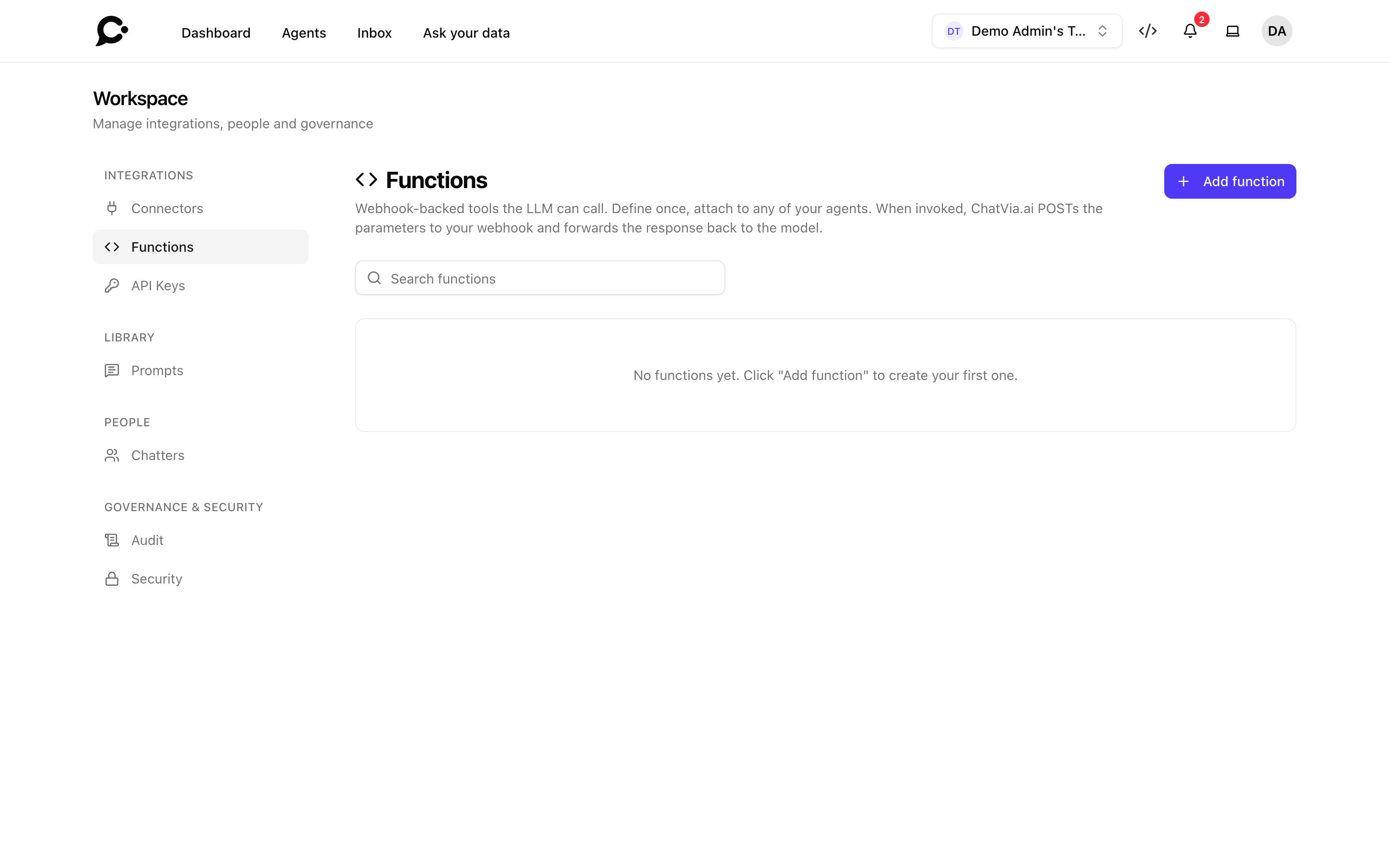
Where to author functions
Functions live at the workspace level in Workspace → Integrations → Functions. Each function can be attached to one or more agents, so your team writes a function once and reuses it across the support agent, the sales agent, and the docs agent.
Anatomy of a function
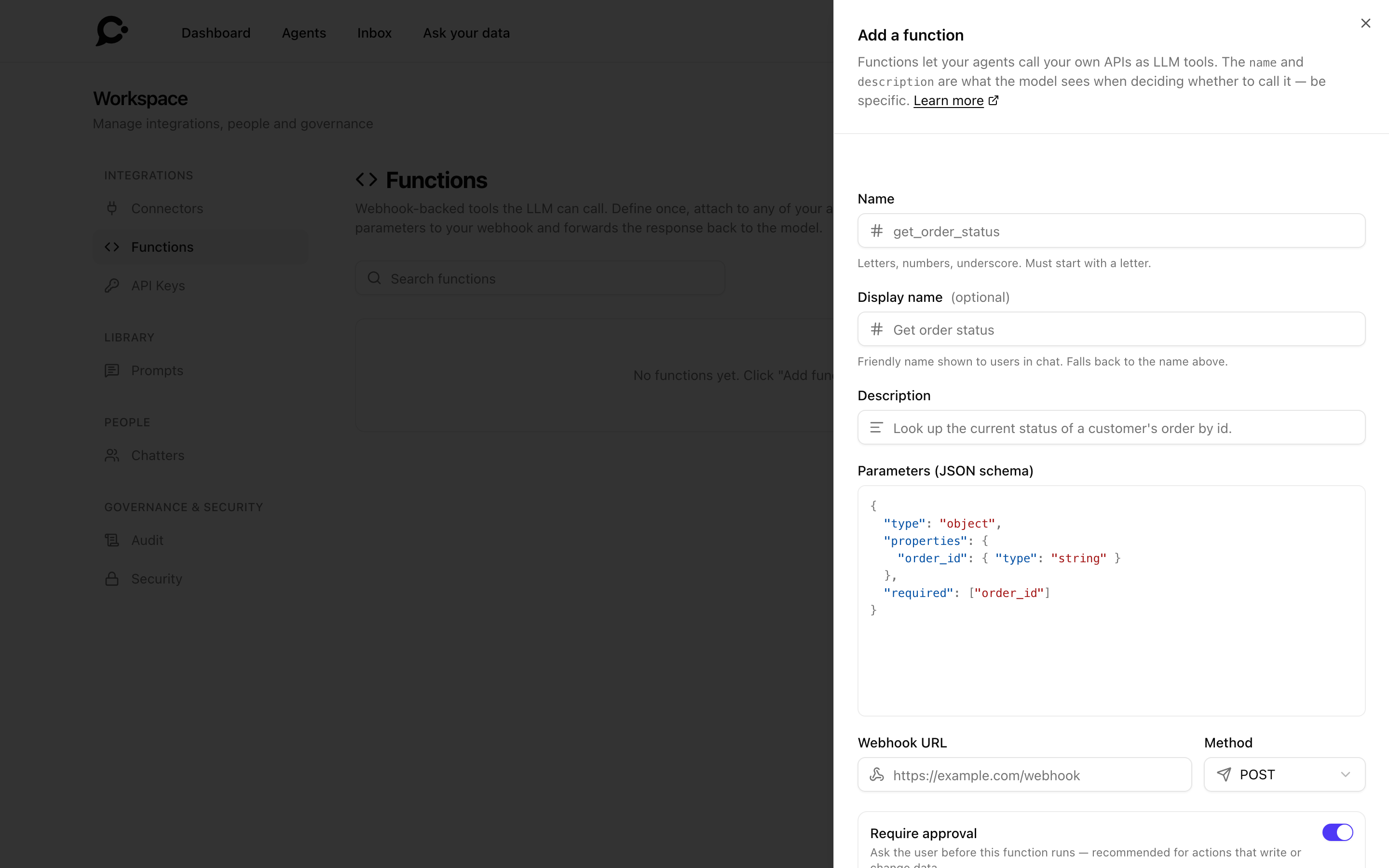
| Field | Purpose |
|---|---|
| Name | The identifier the model sees (lookup_order): letters, digits and underscores, starting with a letter. |
| Display name | Optional. A friendly name shown to people in chat. Falls back to the name. |
| Description | A sentence telling the model when to call this. Critical for triggering. |
| Parameters (JSON schema) | JSON Schema describing the arguments. Used to check the model's call: arguments not listed under properties are removed, and a missing required argument or one of the wrong type stops the call. |
| Webhook URL | The endpoint Chatvia calls. |
| Method | POST (default), GET, PATCH, or DELETE. GET sends the arguments as a query string. The other methods send them as a JSON body. |
| Auth | None, Bearer token, custom header, or HMAC signature. |
| Require approval | Pause the turn for a person to approve before the function runs. On by default for POST, PATCH and DELETE, off for GET. |
| Timeout | Max time to wait for a response (default 10 s, from 1 to 30 s). Set it through the API (timeout_ms). |
A response longer than about 64 KB is cut off before the model sees it.
A worked example
A function that looks up an order by ID:
{
  "internal_name": "lookup_order",
  "description": "Retrieve order details (status, items, shipping address) for a given order ID.",
  "parameters_schema": {
    "type": "object",
    "properties": {
      "order_id": {
        "type": "string",
        "description": "The order's external identifier, e.g. ORD-12345"
      }
    },
    "required": ["order_id"]
  },
  "webhook_url": "https://api.acme.com/internal/orders/lookup",
  "webhook_method": "POST",
  "auth_type": "bearer",
  "auth_value": "...",
  "timeout_ms": 8000
}
When a chatter says "where's my order ORD-12345?", the model calls lookup_order with { "order_id": "ORD-12345" }. Chatvia sends a POST request to your URL:
POST /internal/orders/lookup HTTP/1.1
Authorization: Bearer …
Content-Type: application/json
X-Chatvia-Agent-Id: …
X-Chatvia-Workspace-Id: …

{ "order_id": "ORD-12345" }
Every call also carries X-Chatvia-Agent-Id, X-Chatvia-Workspace-Id and X-Chatvia-Metadata (the agent's metadata as JSON). Inside a conversation it adds X-Chatvia-Conversation-Id, and X-Chatvia-Chatter-Id when a signed-in chatter is talking.
Your endpoint returns JSON:
{
  "status": "shipped",
  "tracking_url": "https://parcel.example/track/9X3K",
  "shipped_at": "2026-05-28"
}
The model uses that JSON to compose its reply, usually summarizing it in natural language.
Writing a good description
The model decides whether to call a function based mostly on its description. Be specific:
- ✅ "Retrieve order details (status, items, shipping address) for a given order ID."
- ❌ "Order helper."
If two functions sound similar, the model will get confused about which to call. Mention disambiguating words ("by order ID", "by customer email").
Attaching to agents
From Workspace → Integrations → Functions, open a function's Agents tab to attach or detach it from specific agents. Or do it the other way around from the agent's Training → Functions page. A function only runs for an agent it has been attached to: workspace-level authoring, per-agent activation.
Approval flow
Some functions write to your business systems: refund an order, cancel a subscription, push to production. For those, turn on Require approval on the function. It is on by default for POST, PATCH and DELETE functions. When the agent decides to call it, the reply pauses. The person chatting sees a Needs approval card with the function and what it will send (Show details), and two buttons: Approve and Deny.
- Approve: Chatvia sends the request, feeds the response back to the model, and the turn resumes.
- Deny: the model is told the call was rejected and writes its reply without invoking the function.
Read-only lookups (order status, inventory) are usually safe to leave on auto-run. Reserve approval for actions that change state.
Only the Hosted Chat can ask for approval
The Approve and Deny buttons exist only in the Hosted Chat. In the Chat Widget, the Command Bar, messaging apps and the API, the agent is never offered a function that needs approval. It tells the chatter it can't do that there. If a function must work on your website widget, turn Require approval off, and make sure your webhook checks what it is asked to do.
Only signed-in chatters can approve
Only a person who is signed in can approve a function: a chatter with an account, or someone from your team. A visitor who is not signed in is never offered a function that needs approval, in typed chat or in a voice call.
TIP
Approval is set per function in Workspace → Integrations → Functions. You can change it any time without editing the schema.
Security
- The webhook URL is called server-to-server from Chatvia. Chatters never see it, and neither does the model. When a call fails, the model only learns that the webhook could not be reached or failed. The function's Last error shows the error with the address cut down to its host name, because the path or query of a webhook URL is often a secret.
- Your webhook's response goes to the model only. It is never sent to the chat window.
- The
X-Chatvia-Conversation-Idheader is sent only for a conversation that belongs to the person chatting.X-Chatvia-Chatter-Idis sent whenever a signed-in chatter is talking, also on a call that runs after their approval. - Use the authentication field to check that the request comes from Chatvia. A Bearer token or a custom header is simple. An HMAC signature is the strongest choice, because the secret is never sent over the network (see below).
- For extra safety, allow only your Chatvia server's outbound IP address in your firewall.
- Returning large responses inflates token cost and slows the conversation. Keep responses to what the model needs to answer.
Verifying HMAC signatures
When a function uses HMAC signature authentication, you choose a secret and save it in the function. Chatvia never sends the secret. Instead, it signs every request and adds two headers:
| Header | Value |
|---|---|
X-Chatvia-Timestamp |
The time the request was signed, in Unix seconds. |
X-Chatvia-Signature |
sha256= followed by a hex HMAC-SHA256 signature. |
Chatvia signs this text with your secret:
{timestamp}.{payload}{timestamp}is the value of theX-Chatvia-Timestampheader.{payload}is the raw request body forPOST,PATCHandDELETE.{payload}is the raw query string (the part after?) forGET. It is empty when there are no arguments.
To check a request on your server:
- Read the raw body (or the raw query string for
GET) before you parse it. Parsing and encoding it again can change the bytes. - Build
{timestamp}.{payload}and compute the HMAC-SHA256 with your secret. - Compare your result with the signature in the header. Use a constant-time compare.
- Reject the request if the timestamp is more than 5 minutes old. This stops someone from sending a captured request again later.
Example in Node.js (Express):
const crypto = require('crypto');
const express = require('express');

const app = express();
const SECRET = process.env.CHATVIA_FUNCTION_SECRET;

// Keep the raw body so the signature can be checked.
app.use(express.raw({ type: 'application/json' }));

function isValidChatviaRequest(req) {
  const timestamp = req.get('X-Chatvia-Timestamp') || '';
  const signature = req.get('X-Chatvia-Signature') || '';

  const age = Math.abs(Date.now() / 1000 - Number(timestamp));
  if (!timestamp || Number.isNaN(age) || age > 300) return false;

  const payload = req.method === 'GET'
    ? (req.originalUrl.split('?')[1] || '')
    : (req.body.length ? req.body.toString('utf8') : '');

  const expected = 'sha256=' + crypto
    .createHmac('sha256', SECRET)
    .update(`${timestamp}.${payload}`)
    .digest('hex');

  const a = Buffer.from(expected);
  const b = Buffer.from(signature);
  return a.length === b.length && crypto.timingSafeEqual(a, b);
}

app.post('/internal/orders/lookup', (req, res) => {
  if (!isValidChatviaRequest(req)) return res.status(401).end();
  const args = JSON.parse(req.body.toString('utf8'));
  // ... look up the order ...
  res.json({ status: 'shipped' });
});
Example in PHP:
$secret = getenv('CHATVIA_FUNCTION_SECRET');
$timestamp = $_SERVER['HTTP_X_CHATVIA_TIMESTAMP'] ?? '';
$signature = $_SERVER['HTTP_X_CHATVIA_SIGNATURE'] ?? '';

$payload = $_SERVER['REQUEST_METHOD'] === 'GET'
    ? ($_SERVER['QUERY_STRING'] ?? '')
    : file_get_contents('php://input');

$expected = 'sha256=' . hash_hmac('sha256', $timestamp . '.' . $payload, $secret);

if (abs(time() - (int) $timestamp) > 300 || ! hash_equals($expected, $signature)) {
    http_response_code(401);
    exit;
}
Observability
Each function tracks:
- Invocation count: total times called across all agents.
- Last invoked at: timestamp of the last call.
- Last error: most recent failure message, if any. An agent's Functions page marks a function whose last call failed.
The API returns the count and the last call time. Analytics → Sources shows how often each agent used a function. Use these to spot broken integrations before your customers notice.
Disabling temporarily
Switch a function off with its Enabled toggle, without deleting it. A disabled function stays attached to its agents, but no agent can call it until your team turns it on again.
Functions via API
Your team can manage functions programmatically. That's useful if you generate function definitions from your OpenAPI schema. See Functions in the API reference. The API can't turn Require approval on or off. A function made through the API needs approval when its method is POST, PATCH or DELETE. Change it in the dashboard.