Sources overview

Sources are the knowledge an agent answers from: your business's docs, policies, runbooks, FAQs, and recorded know-how. Without sources an agent will refuse most questions. Its persona instructions tell it not to make things up.
Sources belong to an agent. There is no workspace-wide "Knowledge Base" page in the dashboard. To manage sources, open the agent and go to Sources in its sidebar (under Training).
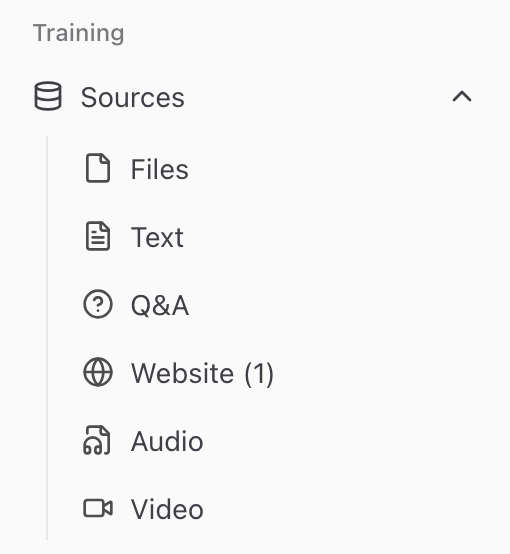
The types of sources
Click Sources under Training in the agent's sidebar. It opens a menu with one page per type:
| Type | Best for | Page |
|---|---|---|
| Files | PDFs, Word docs, Markdown, spreadsheets, slides, ebooks, scanned images | Files |
| Text | Short snippets, policies | Text snippets |
| Q&A | Direct overrides, canonical answers | Q&A pairs |
| Website | Public websites, doc portals | Web pages |
| Audio | Recorded calls, voice notes, podcasts | Audio |
| Video | Recorded demos, trainings, webinars | Video |
You only see the types your role may train. Website shows when the admin set up the web scraper, and Audio and Video when the admin turned them on. A hidden type still shows when the agent already has sources of that type.
How ingestion works
Files, recordings and websites wait until you click Train. Text and Q&A entries are trained when you save them. Training runs as a background job:
- Parse: extract the text from the source. For audio and video, this means writing down what is said.
- Chunk: split it into short blocks.
- Embed: turn each block into a vector that captures its meaning.
- Index: store the blocks and their vectors so they can be searched.
- Summarize (optional): when the admin of your Chatvia server turns on AI enhancement, write a summary of the source and detect its language and kind of document. See Knowledge settings.
You'll see the source's status change live, for example Pending → Training → Trained (or Failed). The exact words differ a little between the source lists. Most ingestions complete in seconds to minutes. Very large files can take longer. From source to knowledge explains each step.
Retrieval at query time
When a chatter asks the agent a question:
- The question is turned into a vector the same way the sources were.
- Chatvia finds the closest matching blocks across all of the agent's sources.
- Weak matches are left out. With a reranker, a second pass also reorders the candidates so the most relevant ones come first.
- Those top blocks are passed to the AI alongside the question and the persona.
- The AI grounds its answer in those blocks. Chatlog shows your team which were used.
Sources and limits
- Adding, processing, and retraining sources does not count against a monthly message limit. Only agent replies count.
- Deleting a source frees its storage immediately and removes its chunks from the index.
Retraining a source
If the underlying content changes, update the source:
- Website: click Retrain, or set Auto-refresh. Chatvia reads the pages again and only indexes again the pages that changed. See Web sources.
- File: click Replace with a new version and upload the new file. It keeps its place in every agent that uses it, and trains again. See File sources.
- Text and Q&A: edit the entry and save it. It trains again.
A replaced file or an edited text loses its old chunks right away, so it can't be found until it finishes training. The rest of the agent keeps working in the meantime.
Permissions
Sources belong to the agent, and the agent belongs to your workspace. A teammate's role decides which kinds of sources they may train (files, text, Q&A, web, audio, video) and whether they may delete sources. Chatters only see the agent's answers in chat. They never see the source list or manage sources themselves.